Back to School Doodle Pack – 3 Creative Styles
Whether you are a teacher preparing classroom materials, a small business owner launching a seasonal campaign, or a hobbyist exploring digital design for the first time, finding graphics that are both flexible and visually cohesive can be a challenge. The Back to School Doodle Pack – 3 Styles offers a straightforward solution: a collection of hand-drawn vector doodle school supplies presented in three distinct looks—drawing, chalkboard, and color. This article walks through what the pack contains, why it stands out, and how you can put it to work in real projects.
What the Doodle Pack Offers
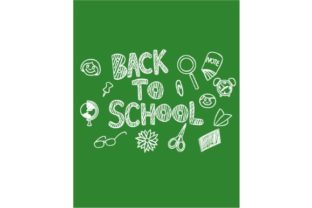
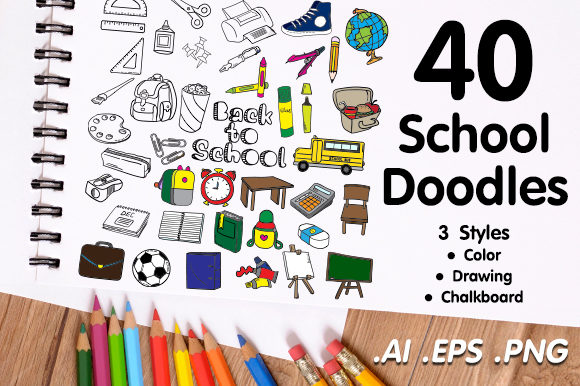
At its core, this is a set of school-themed vector illustrations. Think pencils, books, apples, rulers, backpacks, globes, and similar classroom icons. What makes it different from a generic clip art bundle is the three-style presentation. Every object has been drawn by hand, then offered in three versions: a clean ink-like drawing style, a textured chalkboard effect, and a fully colored variant. That means you get the same doodle repeated in three visual moods, ready to drop into any layout.
The pack arrives in vector format, which is a key advantage. Unlike pixel-based images, vector files can be scaled up or down without losing sharpness. A small doodle on a flyer can become a large focus point on a poster, and it will remain crisp. This is especially useful if you work across different media—digital screens, prints, or even large banners.
What Comes in the Download
Understanding the file contents helps you plan your workflow. The download includes:
- 1 vector .AI file with 3 artboards – Each artboard holds one of the three styles, so you can see all doodles organized by look.
- 3 vector .EPS files – One for each style, giving you broad compatibility with design software like Adobe Illustrator, CorelDRAW, Affinity Designer, and even some free tools.
- 120 transparent .PNG files – Every individual object is saved separately with a transparent background. This is a huge time-saver if you want to drag and drop items directly into a project without editing.
With 120 separate PNG files, you have immediate access to each doodle in isolation. No need to open a large file and manually extract elements. This is especially helpful if you are not deeply experienced with vector software and prefer a ready-to-use image format.
Why Three Styles Matter
The three-style approach solves a common problem: matching graphics to the tone of your project. A drawing style gives a sketch-like, casual feel—great for worksheets, planners, or informal social media posts. The chalkboard style mimics the look of chalk on a dark surface, perfect for classroom signs, cafe menus, or nostalgic back-to-school themes. The color style offers a bright, polished look that works well on websites, ads, product labels, or any place where a friendly, professional appearance is needed.
Instead of hunting for three separate packs to cover these moods, you get everything in one download. This saves time, ensures visual consistency, and reduces the effort of matching styles from different sources.
Who Can Benefit from This Pack
Because the files are easy to use and come in multiple formats, the pack suits a wide range of users:
- Educators and teachers – Create classroom decorations, bulletin board headers, flashcards, handouts, or digital lesson slides with doodles that students find friendly and engaging.
- Small business owners and entrepreneurs – Design seasonal promotions, back-to-school sale banners, product tags, or packaging inserts without hiring a professional illustrator.
- Bloggers and content creators – Add hand-drawn accents to blog post images, YouTube thumbnails, Pinterest pins, or social media stories. The chalkboard style, in particular, stands out on platforms where visual novelty grabs attention.
- Freelancers and graphic designers – Use the doodles as building blocks for client projects. The vector format lets you recolor, resize, or combine elements seamlessly.
- Hobbyists and casual users – If you make custom greeting cards, scrapbooks, party invitations, or digital journals, these doodles give a personal, handcrafted look without requiring drawing skills.
Real Use Cases to Inspire You
Rather than listing abstract possibilities, here are concrete examples of how the pack can be applied:
- Classroom newsletter – Combine the color style doodles with a simple text layout to create a monthly newsletter for parents. The bright icons make the information more approachable.
- Chalkboard-style cafe sign – A coffee shop running a "back to school" special could use the chalkboard doodles on a dark background to mimic a physical chalkboard, printed as an A3 poster.
- Digital planner stickers – Import the transparent PNG doodles into a note-taking app like GoodNotes or Notability. Use them as stickers to mark school-related events or tasks.
- Website hero section – A tutoring service could place a few drawing-style doodles around the headline to soften the design and add a friendly, handmade feel.
- Product packaging – If you sell stationery or school supplies online, you can use the color doodles as decorative elements on your packaging inserts or thank-you cards.
Important Considerations Before You Start
While the pack is designed to be accessible, a few points are worth noting:
- Software compatibility – The .AI and .EPS files work best with vector editing programs. If you only have basic image editing software, you will likely rely on the PNG files, which are still very usable but do not allow infinite scaling.
- Editing vector files – If you want to change colors or adjust the doodles, you will need to use software that supports vector editing. That opens up customization options like matching the doodle colors to your brand palette.
- Transparent PNGs – The 120 individual PNGs are high resolution and ready to insert into presentations, documents, or web layouts. They work with almost any program, from Microsoft Word to Canva to Adobe Photoshop.
- License limits – Always check the included license for commercial use terms. Most doodle packs allow commercial use, but restrictions can vary (e.g., reselling the raw files as your own is usually not allowed).
Practical Tips for Getting the Most Out of the Pack
If you are new to using vector doodles, here are a few observations that can save time:
- Start with the PNG files if you want immediate results. They are ready to drag into your project without any extra steps.
- If you need consistent sizing, open the .AI or .EPS file and scale the objects as a group. This is faster than resizing each PNG individually.
- Mix styles intentionally. For a layered look, use the chalkboard doodles as a background texture and the color doodles as foreground accents.
- Keep the original files organized on your computer. With 120 individual images, a clear folder structure helps you locate a specific doodle quickly.
Final Thoughts on the Back to School Doodle Pack – 3 Styles
This doodle pack stands out because it offers genuine flexibility without overwhelming the user. The three styles cover a broad range of visual tones, and the inclusion of both vector and PNG formats means it works for people at different skill levels. Whether you are a professional designer looking for quick elements to drop into a layout, or a parent creating a homework chart at home, the pack provides a reliable, ready-to-use set of school-themed graphics. The hand-drawn quality adds a human touch that standard clip art often lacks, making your projects feel more personal and approachable.
If you are planning any school-related content in the coming months—whether for work, education, or personal projects—having this pack in your toolkit can simplify your design process and help you produce consistent, attractive results with minimal effort.